

What determines the measured speed
A 2.5 Gbps FTTH or FTTP plan describes a nominal maximum for the service under the provider’s terms. It does not promise that one computer will always download at 2.5 Gbps, or that an app will transfer files at 312.5 MB/s. The result depends on the contract and every link between the provider’s network and the measurement server: ONT, router, Ethernet port or Wi-Fi, computer, software and server.
To find where speed drops, follow the path from the fiber to the test server and check the ports, connection and device. A plan’s headline rate and a measured result are not the same thing.
Gbps and MB/s measure different things
Network rates are usually expressed in bits per second. Many file-transfer apps show bytes per second instead. A lowercase b means bit; an uppercase B means byte. One byte contains eight bits.
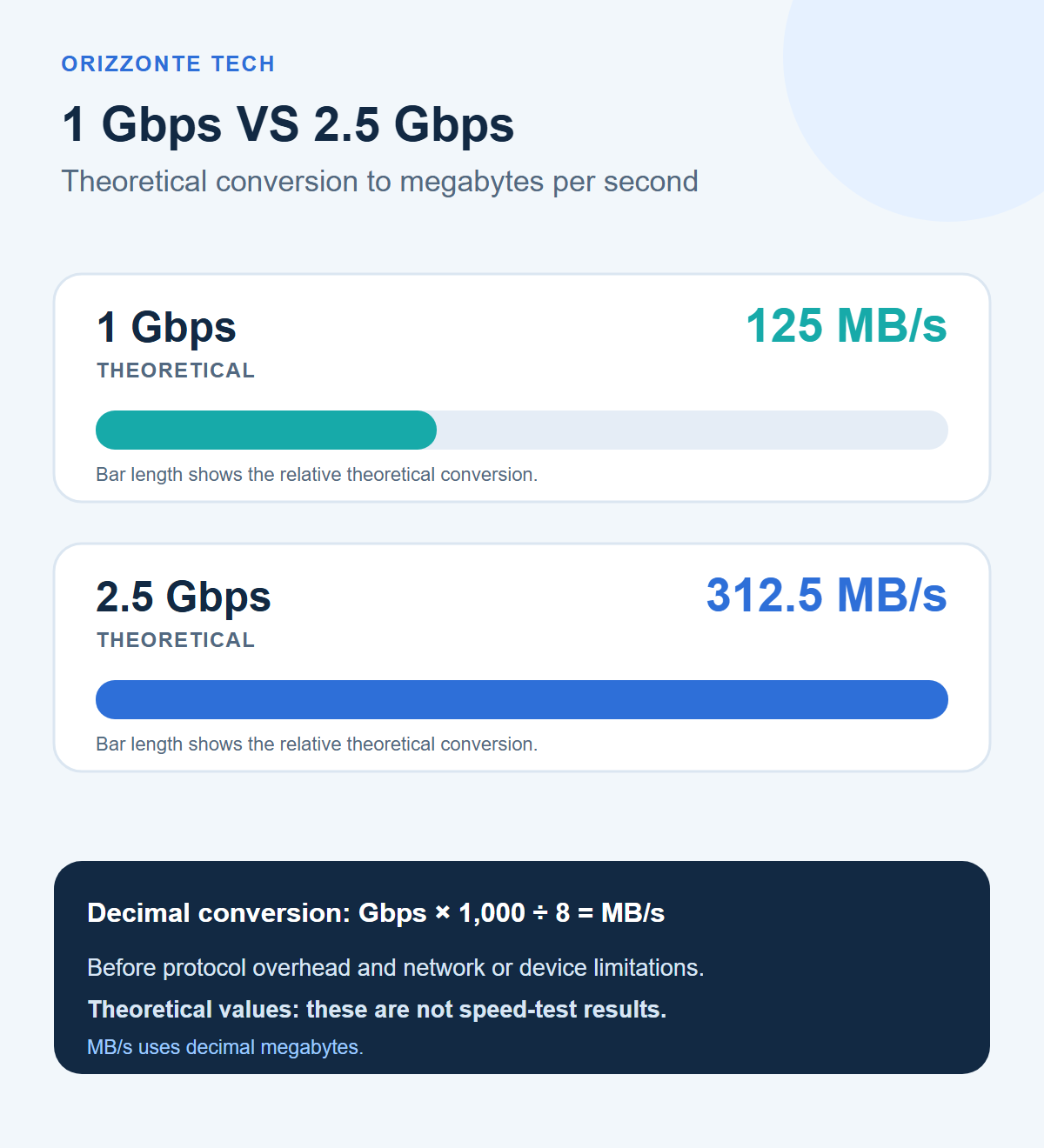
Using decimal units:
- 1 Gbps is 1,000 Mbps, or 125 MB/s in a simple theoretical conversion.
- 2.5 Gbps is 2,500 Mbps, or 312.5 MB/s in the same conversion.
Technical explanation: dividing by eight converts bits to bytes. It does not account for the information needed to carry network traffic, or for limits in a device, storage drive, application or remote server. So 312.5 MB/s is a mathematical reference ceiling, not a promised application download speed. MB and GB here use decimal units; they are not the same as MiB and GiB.
What a “2.5 Gbps” plan actually tells you
The precise meaning depends on the provider’s offer. Check whether the advertised figure refers to download, upload or both, and look in the contract for any estimated, normally available or minimum speed commitments. These values and remedies vary by provider and country.
An internet access connection may serve several devices in the home, but that does not mean each device can receive the maximum rate at the same time. A single transfer is limited by the path used by that device. Connecting multiple devices also does not turn a 1 Gbps port into a 2.5 Gbps port; distribution depends on the router’s ports and the provider’s network design.
IEEE 802.3bz defines 2.5 and 5 Gb/s Ethernet over balanced twisted-pair cabling. That establishes 2.5 Gb/s as a standard Ethernet link rate; it does not certify your internet line or the speed of an application transfer.
Follow the path from the fiber to the test server
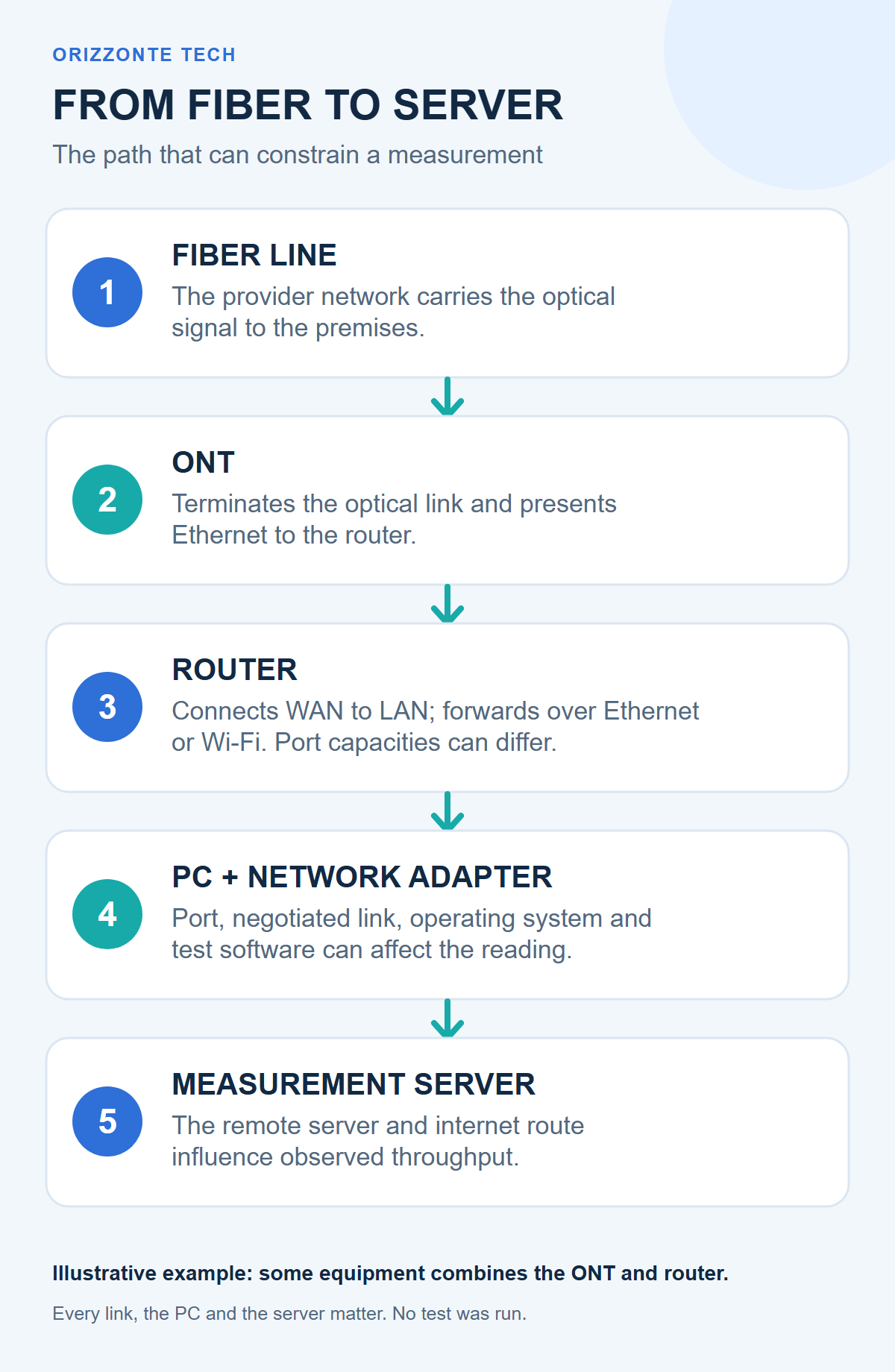
A typical FTTH setup carries data along this route:
Fiber → ONT → router WAN port → LAN port or Wi-Fi → computer network adapter → operating system and test software → measurement server.
The ONT terminates the optical connection and presents a network link to the router; some equipment combines the ONT and router. Check the specifications and port roles for the actual equipment. Every link must support the rate you want to measure.
1 Gbps and 2.5 Gbps Ethernet
| Nominal link rate | Theoretical byte conversion | Practical limit |
|---|---|---|
| 1 Gbps Ethernet | 125 MB/s | One 1 Gbps link cannot carry 2.5 Gbps to a single device |
| 2.5 Gbps Ethernet | 312.5 MB/s | Still theoretical; other links also matter |
If your computer is plugged into a 1 Gbps LAN port, that port limits the single computer even if the plan and router’s WAN port are rated at 2.5 Gbps. To use more than 1 Gbps over a wired connection, the router port, computer’s Ethernet adapter and the rest of the path must all be suitable. A multi-gigabit port can also negotiate a lower rate, so check the link rate actually established.
Diagnostic hypothesis, not a conclusion: if the operating system reports a 1 Gbps negotiated link, that computer is not using a 2.5 Gbps Ethernet link at that moment. This narrows the checks to the port, adapter, cable and configuration. It does not identify which one is responsible, and it says nothing by itself about the provider’s line speed.
Wi-Fi, the computer and the server affect the result
A Wi-Fi test measures the radio link as well as everything beyond it. Distance, walls, band, channel width, interference, access-point capability and the client device can all affect throughput. A Wi-Fi headline rate is not the same as the speed a single app will reach in a particular home.
A wired computer can also be the limiting factor: its network adapter and drivers, processor, operating system, browser or test app, and other activity can influence a result. The test server and internet route to it matter too; either may be congested or have different capacity. One result, especially over Wi-Fi or while other devices are transferring data, cannot reliably identify whether the fiber, router or computer is at fault.
Nominal speed, minimum commitment and measured speed
The nominal speed is the advertised or plan-profile maximum. Estimated, normally available and minimum contractual speeds are separate values, where the contract provides them. They are specific to the provider and plan; the marketing headline alone does not tell you what applies.
A measured speed is the result under particular conditions, using a particular device, connection and server. A result below the nominal figure does not automatically prove a service breach. Check that the test used a suitable connection, compare it with the relevant contract values, and record the conditions before drawing conclusions.
A first home check, without changing your network
- Read the contract. Record the advertised, normally available and minimum speeds that apply, separately for download and upload.
- Map the actual route. Identify the ONT, router WAN port, LAN port, any switches, connection type and computer adapter. Check the equipment specifications; do not infer a port’s speed from its appearance or count.
- Use Ethernet if available. Connect to a LAN port suitable for the rate being checked. Look up the negotiated link rate in the operating system or router. Record Wi-Fi tests separately.
- Limit variables. Note any VPN, cloud sync, streaming or other transfers. Avoid comparing measurements made under very different conditions.
- Repeat and record. Save the time, device, adapter, port, connection type and negotiated rate, test/server, download, upload and latency. Several documented results are more useful than one isolated number, but they are not a contractual certification.
This process can help narrow down an area to investigate. It is not a certified test, and it does not automatically attribute a cause to one component.
When to use a certified measurement
The official route depends on where you live and on your provider’s terms. In Italy, AGCOM’s MisuraInternet project distinguishes its online speed test—a snapshot with no probative value for proving contractual non-compliance—from the certified Ne.Me.Sys. measurement, which can produce results with evidentiary value under the Authority’s procedure. Follow the current official instructions before starting; the required computer, router connection and test conditions may differ from an ordinary browser test.
For UK readers, Ofcom’s Broadband Speeds Code of Practice provides a framework for participating providers. Check whether your provider is a signatory and read the terms that apply to your service. Do not assume that the Italian AGCOM procedure or any specific remedy applies in the UK or elsewhere. Keep your contract and measurement results; complaint routes and remedies depend on the country, provider and current rules.
The takeaway
A 2.5 Gbps fiber plan can provide substantial capacity to a home network, but an individual device can use more than 1 Gbps only when its whole path supports it. The 312.5 MB/s conversion is a theoretical decimal ceiling, not a file-transfer prediction or a substitute for the contract. Check the ports actually in use, the negotiated link rate and repeatable measurements. If you suspect a contractual problem, use the official procedure for your country rather than relying on one browser speed-test screenshot.
Sources checked
Checked 28 October 2026. These sources describe standards and measurement procedures; the individual broadband contract remains the reference for plan-specific speeds.
- IEEE — IEEE 802.3-2022, including amendment 802.3bz: includes 2.5GBASE-T and 5GBASE-T Ethernet.
- Ofcom — Broadband speeds: what you need to know: UK speed information and the Broadband Speeds Code of Practice for participating providers.
- AGCOM — The MisuraInternet project: Italy’s fixed-network measurement project and the distinction between its online test and certified measurement.
- AGCOM — Online Speed Test: purpose and limits of the point-in-time web measurement.
- AGCOM — Certified measurement with Ne.Me.Sys.: the certified procedure and its conditions.



Comments
Comments
Join the discussion respectfully: reasoned criticism is welcome; avoid threats, abuse, personal data and promotional links.
To join the discussion, you'll need to sign in with your WordPress.com account. This feature will be available when the site launches.